
Plumbers · Guide
How to Add Your Plumbing Business to Google (Belfast Walkthrough)
 By Rank NI · 27 May 2026 Updated 19 June 2026
Part of: SEO for Tradesmen in NI
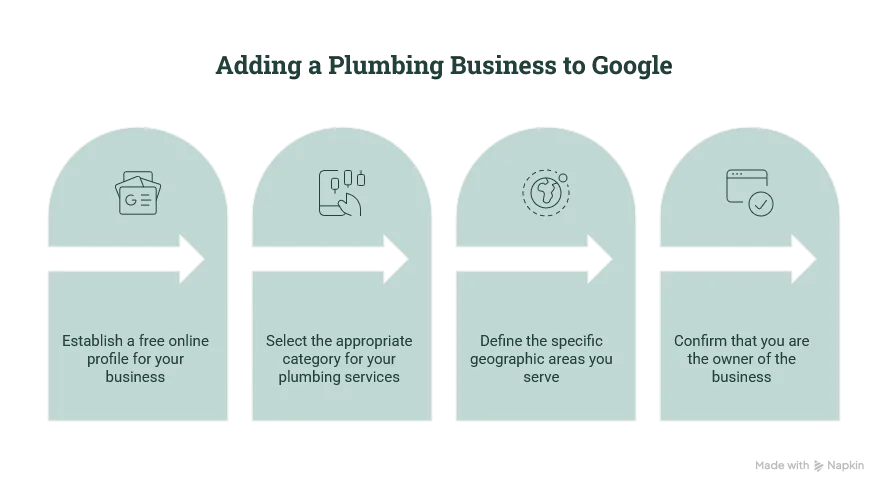
Short answer: you add your plumbing business to Google by creating a free Google Business Profile, choosing the right trade category, setting your real BT-postcode service areas, and verifying it’s yours. It’s free, it takes most of an hour, and it’s the single highest-return thing a Belfast plumber can do online.
Whether you call yourself a plumber, heating engineer, gas man or Phoenix-registered installer, this is how customers find you when they Google “plumber near me” at 8am with no hot water.
How do I add my business to Google?
Go to google.com/business, create a profile, and pick the category that matches your trade, Plumber, Heating contractor or Gas installation service. Google then asks you to verify ownership before the listing goes live in search and Maps.
If a listing for your business already exists (Google sometimes auto-creates them from old directory data), you don’t add a new one, you claim the existing one instead, or you’ll end up with a confusing duplicate.
Claim vs add, which do I need?
If you search your business name and a listing already appears, click “Claim this business”. If nothing comes up, add a new one. Adding a second listing when one already exists splits your reviews across two profiles and weakens both.
A duplicate listing is one of the most common problems we find on NI trades’ profiles, often an old auto-generated one with a wrong number or a closed address. Cleaning that up alone can move a plumber up the map pack.
What should I put on it?
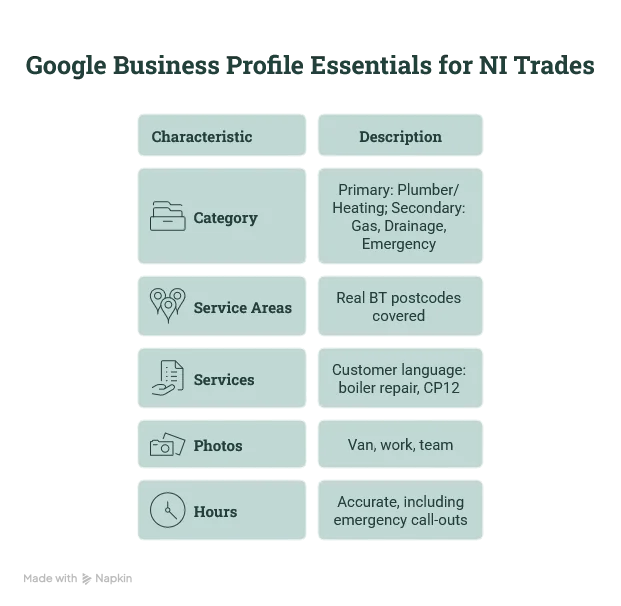
Get these right and you’re ahead of most NI trades:
- Category: Plumber or Heating contractor as primary; add gas, drainage, emergency as secondary.
- Service areas: the real BT postcodes you cover, not “United Kingdom”. Belfast BT1–BT17, plus Lisburn (BT27/28), Bangor (BT19/20), Newtownabbey (BT36/37), wherever your van goes.
- Services: list them in customer language, boiler repair, oil boiler service, landlord gas safety certificate (CP12), power flush, oil-to-gas conversion.
- Photos: your van, your work, your team. Real photos beat stock every time.
- Hours: accurate, including whether you do emergency call-outs.
Adding it is step one, not the finish line
A claimed profile that just sits there won’t rank. The plumbers winning the Belfast map pack have recent reviews, complete information and regular activity. We walk through that in Google Business Profile for plumbers, and if your listing won’t verify, see our guide on verifying your business on Google.
Want it done for you, properly, first time? Book a free 10-minute audit and we’ll set the foundation right.